Developer's confession, building a custom passkey authenticator
Intro
I’ve been following the FIDO2 → passkeys story for a few years now. It started during my PhD, when I was digging into it as part of my research, and later continued at work, where I tried a few small real-world deployments—just enough to run into all the odd edge cases nobody talks about.
Along the way I’ve shared what I’ve learned, given a few talks, and yes, occasionally complained about how messy things can get when theory meets production. Still, I’m a big believer in the direction we’re heading: strong authentication that doesn’t make people’s lives harder.
Most recently, I got to take things a step further by building a custom mobile authenticator for an enterprise client. My colleague Vijay and I jumped in without a perfect plan, and (no surprise) the process was anything but linear. We hit a few dead ends, made some pivots, and had plenty of “let’s rethink this” moments. But that’s where the interesting lessons came from — and honestly, it was a lot of fun.
A Chance
The project kicked off with a fun challenge: bring passkeys into the mix as part of a shiny new biometric authentication initiative in the mobile app. Everything lived in the same ecosystem—accounts, the app, the identity provider—so at least the plumbing was all in one place.
At the time, the existing login flow was pretty classic: OpenID Connect (OIDC) authorization code flow, authentication with username, password and weak MFA (SMS or email OTP). Tokens of (BFF session) would then be tucked into device storage and happily reused for API calls. The obvious quick fix? Just let local biometrics unlock the mobile storage and get the tokens from there. The user experience is as expected: provide biometric and you are in. Job done, and everyone gets to go home early.
Even though from the user’s perspective, it feels like “biometric login,” and technically it does add some protection — if someone steals the phone, the tokens can’t be pulled without a fingerprint or face scan, that approach only helps protect the mobile storage. It doesn’t really improve the authentication itself. Users are still logging in with the same weak MFA, if tokens expire. It’s better than nothing, but it doesn’t move much the needle on the overall security model.
And since the long-term plan was to roll biometrics out to other enterprise applications including web logins, we knew we had to go further. So instead of stopping at “unlock the storage,” we aimed for the real win: using device biometrics as part of the passkey transaction. That way, biometrics actually are used to unlock private key that is used to create a valid authentication response.
To highlight the difference: in the first scenario, biometrics are only used to open the storage where a token or session is kept. They are never used in the actual authentication process with the remote server. In our desired approach, biometrics unlock the use of the private key that signs a challenge from the server. This transforms biometrics into a “something you are” factor in the cryprography-based authentication flow: passkey flow.
The Plan
Armed with a strong FIDO/Passkey background, eager developers, and a looming deadline, we figured: why not propose passkey as an authentication stage of the existing OIDC flow?
The idea was simple enough - extend the mobile application to act as a custom passkey authenticator, and trigger it via the WebAuthn API straight from the authentication page of our IDP. We dove into the Android and iOS documentation and quickly realized that we could leverage some of the newer SDK methods to build our authenticator. On Android, this comes through the Credential Manager API from Android 14. Similarly, iOS 17+ Credential Provider provided required functionality.
So in theory, it should have been a breeze: implement the interfaces, register the app as a passkey authenticator in the OS, and voilà — we’re done.
…Except, as you’ve probably guessed, it wasn’t quite that simple.
Pivot(s)
We started with Matthew’s webauthn.io passkeys server, which let us test mobile behavior and SDKs without worrying about the backend. Once the flows felt solid, we planned to switch over to our own IdP server.
Hybrid flow
Even though the hybrid flow wasn’t a top priority for us, it was easy to set up, so we started testing custom authenticator behavior. Let’s quickly explain what the hybrid flow is. It’s a neat way to use your phone to run a passkey flow across devices. The typical scenario is starting authentication in your browser on a laptop, then handing control over to your mobile device to complete the passkey authentication. This process uses BLE and proximity mechanisms.
More information can be found on Passkey Central.
We started with Android, and to our surprise, we couldn’t see our authenticator. After a moment, we realized we might have a serious problem executing our plan — and it was right at the very first registration step. Definitely not a good sign.
Registration
Our first hiccup came right at the registration stage. While the flow technically worked as expected (diagram below), we ran into a major UX issue.
sequenceDiagram
    autonumber
    participant U as User using<br>Our Authenticator
    participant Browser
    participant IDP
    participant OS
    U ->> IDP: Start Flow on Desktop
    IDP ->> Browser: Authentication Page
    Browser->>OS:WebAuthn API<br>navigator.credentials.create()<br>via QR code (hybrid flow)
    U->>OS: Passkey Dialog
    OS->>U: Create Credential
    U->>OS: Registration Response
    OS->>Browser: Registration Response
    Browser->>IDP: Registration Response
When the WebAuthn API in JavaScript is triggered, Android opens its system dialog (step 4. in the diagram). The problem is that it displays all available providers, with the default one highlighted as preferred. To continue, we would have to either ask users to set our app as the default authenticator or guide them step by step on what to select — neither of which is acceptable. The recording below shows the problem.
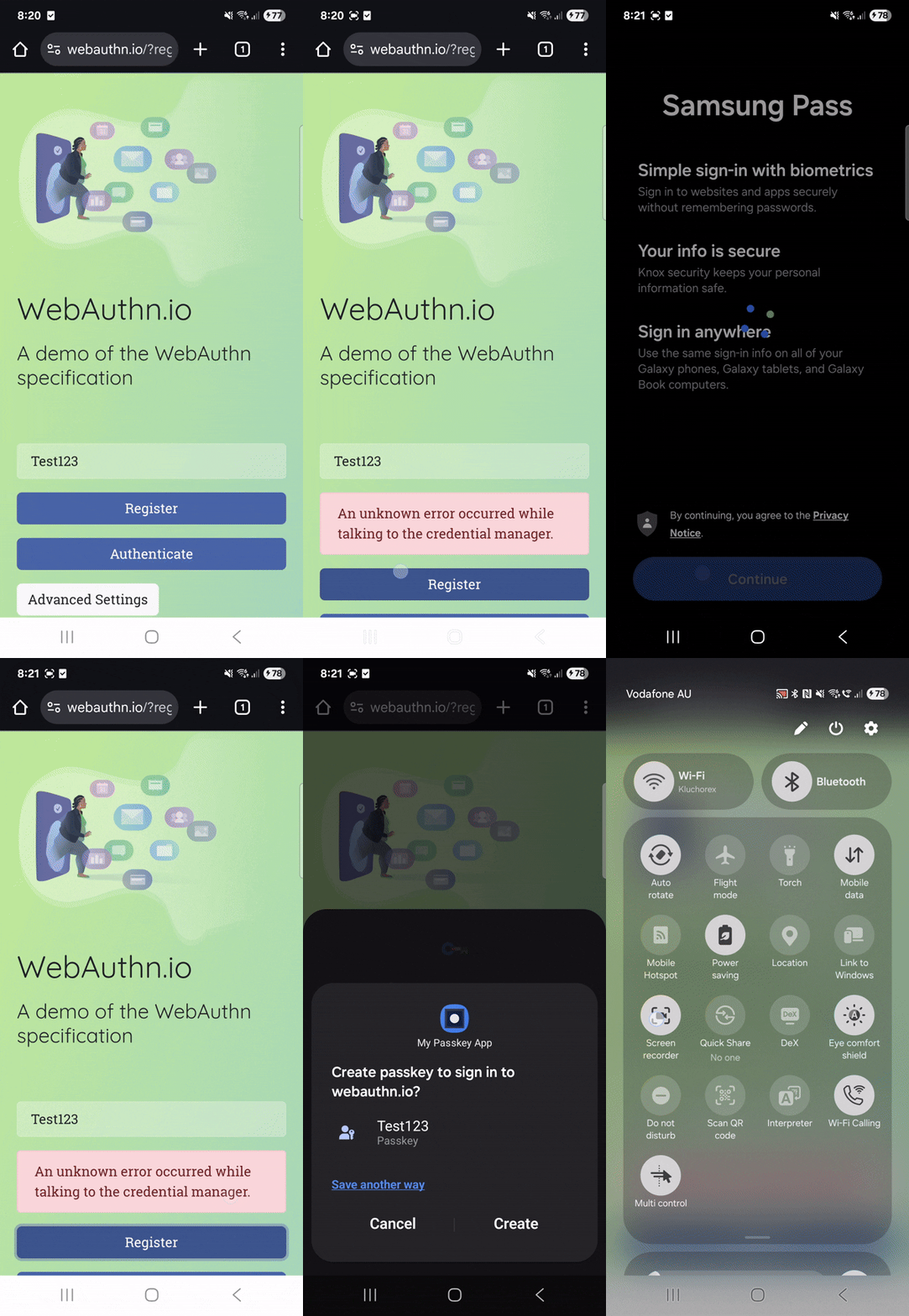
Looking into the WebAuthn Github, we found this exact problem has been raised multiple times, but no solution is available yet.
Pivot No. 1
In our case, however, the system controls the entire credential lifecycle — both the authenticator and the passkey server belong to the same entity. This allowed us to simplify registration by making it a direct REST call from the mobile app to the server, assuming the user has already onboarded to the app and has valid tokens. We showed this in the diagram below.
sequenceDiagram
    autonumber
    participant U as User using<br>Our Authenticator
    participant Browser
    participant IDP
    participant OS
    U ->> IDP: Start Flow
    IDP ->> U: Challenge
    U->>U: Create Credential
    U->>IDP: Registration Response
It’s disappointing to step away from the standard OS-based flow, but we needed a working solution — so this is the path we took.
Custom Authenticator with mobile flow
While running the hybrid flow, the authentication worked as expected. Our custom authenticator was queried to provide the available passkeys for the domain. If any was found, user was presented with this choice regardless if our authenticator was set as default. The same behaviour was observed when WebAuthn flow was triggered from Custom Chrome Tabs.
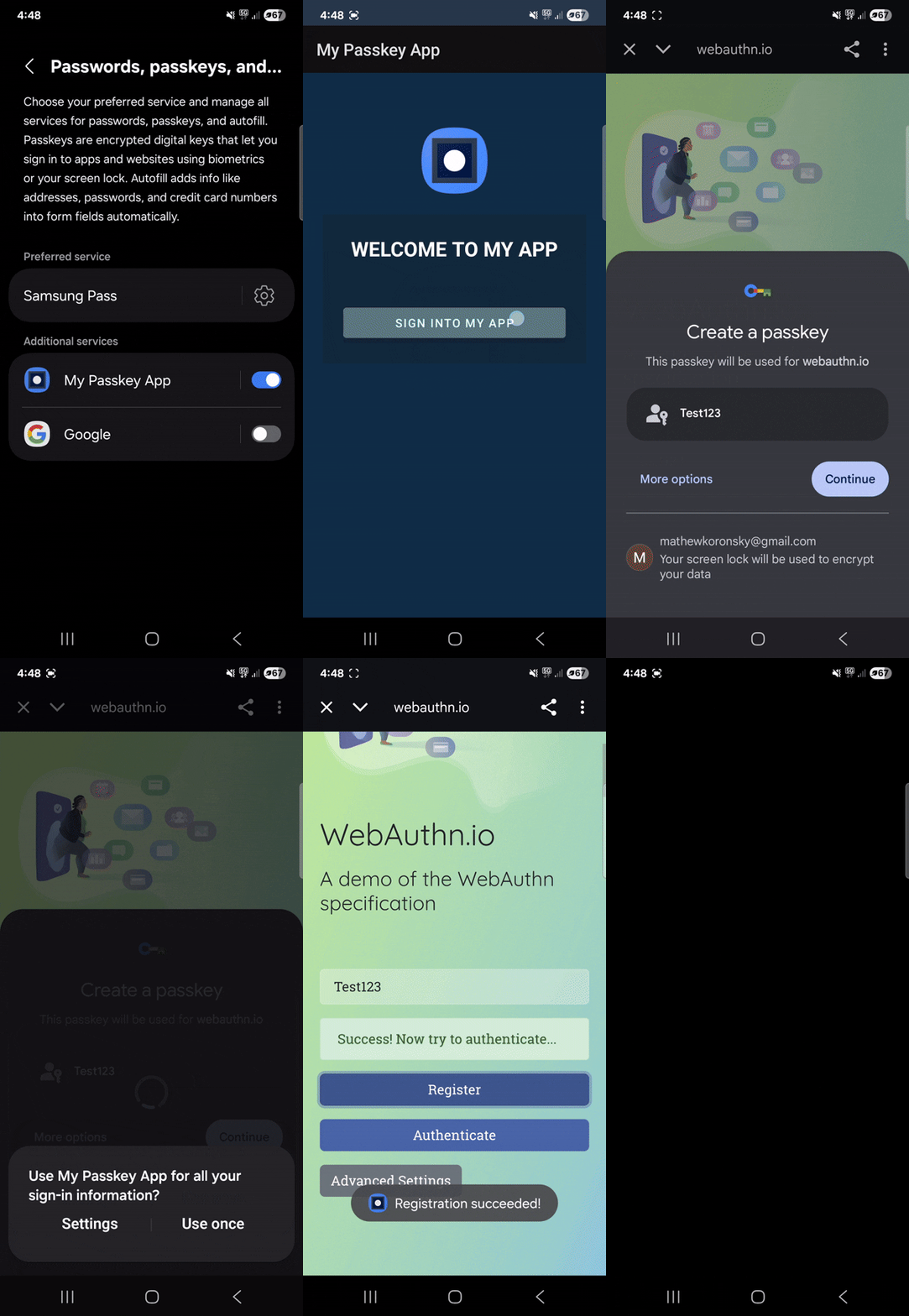
We felt a sense of relief, glad that our initial design wouldn’t need to be completely reworked into a non-native solution. Unfortunately, that relief was short-lived, as we soon ran into another challenge.
Legacy
Even if we could run passkey authentiction flow with the ChromeTabs mechanism, we faced another obstacle: OS versions without passkey support. From the SDKs, we know that the supported systems are Android 14+ and iOS 17+. The next step was to see how widespread those versions actually are. Looking at the Android versions market share, we realized that Android 14 covers only about 50% of the market. As you can imagine, this isn’t something a client would likely accept. So what do we do for older OS versions?
We clearly needed to design a flow that delivers the same functionality for older devices while also not compromising security. By this point, we had already abandoned the OS-native registration flow. Now we were facing a new decision: should we also drop the OS-native passkey authentication flow? And if we do, what’s the point of relying on passkey-based authentication at all?
Pivot No. 2
Before we dive in the solution design, let’s organise requirements and limitations.
- We are in the mobile app which triggers OIDC-based flow in the native browser.
- We cannot rely on WebAuthn API and mobile OS SDKs because of legacy OSes.
- We want to keep the passkeys/FIDO2 protocol to be the core of our authentication flow. We want it to follow the standard with all its security properties. Additionally, we want to be compliant for the future, when hybrid flow for web applications can be used.
So it is clear that our application as well as IDP server will remain passkey compliant. What we need is to modify how IDP server triggers passkey for the use cases we have. Instead of passing the passkey Request (i.e., PublicKeyCredentialRequestOptions in navigator.credentials.get()) in the JavaScript of the authentication page, we pass this through applinks and equivalend for iOS. This way the request will go directly to our custom authenticator application bypassing OS passkey layer. Then, the application submits passkey Response directly to IDP.
Great, technically it works. But let’s look at the security. Cryptography-wise everything remains the same. We only modified the transport mechanism. However, because of this, we broke the phishing resistant property of passkeys - pretty important one. Why is that? When the OS handles the passkey request, it gets the domain name from the calling browser, and then passes this information to authenticators to find the passkey that was registered for this domain. In our solution, this mechanism is bypassed so we need to address it somehow or accept as a risk.
Even though our application opens tabs with URLs fully controlled by us—pointing to our IdP and protected with all standard OIDC security mechanisms (such as nonce, state, and PKCE)—one could still imagine an attack vector where a user is redirected to a malicious man-in-the-middle (MITM) server that mimics our flow.
While this scenario primarily affects legacy operating systems and would require significant effort from an attacker, we decided to address it nonetheless. Unfortunately, Android App Links and iOS Universal Links triggered from within a browser do not expose the origin domain due to privacy protections. As a result, we cannot rely on app link data for domain verification. There are other mechanisms to capture the URL of ChromeTabs as listed in this blog, but they require additional user action which is not acceptable from UX perspective. We could use WebView instead and then we have total control over what is being done in the browser, and thus we could ensure that domain is correct. Switching to WebView, however, breaks SSO flows because cookie jar is not shared between application WebView and OS browser. Nevertheless, for this legacy OS case, it seems to be a reasonable compromise.
sequenceDiagram
    autonumber
    participant U as User using<br>Our Authenticator
    participant B as Browser<br>(ChromeTabs)
    participant IDP
    participant OS
    U ->> B: Start Flow
    B ->> IDP: Start passkey for legacy
    IDP ->> IDP: This is applink flow
    IDP ->> U: Applink with<br>passkey request encoded
    note over U: Biometrics and<br>Passkey Authentication
    U ->> B: Redirect to IDP with passkey Response
    B ->> IDP: passkey Response
    note over IDP: Checks passkey Response
    IDP ->> B: Success
Summary
We started with passkey technology, but along the way, we realized that sticking strictly to OS-native flows wasn’t going to work smoothly in practice. So, we decided to take a different route.
The result is our custom mobile authenticator — it fully supports the passkey protocol but handles registration outside the native OS dialogs to avoid the user interface friction we encountered. For older operating systems, we added a fallback that uses a WebView with app-link-based redirections.
Because both the backend and the authenticator are under the same roof, we could make these integrations safely and efficiently. In the end, the authenticator is now ready for hybrid flow authentication and can also support other mobile apps that use passkey OS APIs.